Showing posts with label Jailbreak iPad. Show all posts

iPhoneIslam the creators of FaceIt3GS which enables facetime calls for the iphone 3gs have out done themselves once again. Today they show us a PhoneItPad new tweak that fully enables phone calls and text messaging on your ipad 3g. It’s always been our dream to hold up the huge ipad to our face and start talking away, the look on peoples face?...According to iPhoneislam

hack that will change the game. Can you imagine turning your iPad to a fully functional phone.

With No Special Hardware all what you need is Jailbroken iPad 3G and your iPad 3G will do anything you expect from iPhone… Phone Calls, SMS, FaceTime by Phone Number… ETC


Finally, Dev-Team had released the untethered jailbreak for iOS 4.3.1 on all iOS devices from iPhone to iPad(except iPad 2) their next objective was to update Ultrasn0w to work on iOS 4.3.1. iPhone 4 users must take extra care while updating to iOS 4.3.1 as they need to prevent the baseband from upgrading. This update only brings iOS 4.3.1 support to basebands which could be unlocked earlier. Therefore, only baseband 01.59.00 can be unlocked on iPhone 4.

Here's the list of basebands that can be unlocked using Ultrasn0w 1.2.1:

iPhone 4:

  • 01.59.00

iPhone 3G/3GS:

  • 04.26.08
  • 05.11.07
  • 05.12.01
  • 05.12.04
  • 06.15.00
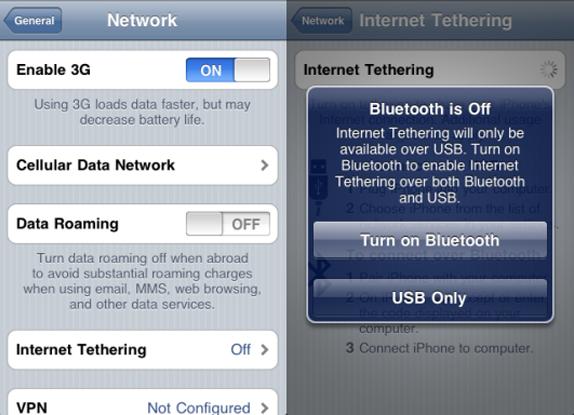
Note: For T-Mobile users in USA should disable 3G under Settings > General > Network. This is due to an incompatibility with T-Mobile’s 3G. Those in other countries do not need to do this, unless they face a problem.

Step 1: Use PwnageTool or Redsn0w to jailbreak your iPhone.
Note: For iPhone 4 users, must use PwnageTool since Redsn0w does not create custom IPSW which is required to prevent baseband upgrade.

Step 2: Launch Cydia on iPhone and add “http://repo666.ultrasn0w.com” as the new repository URL. You can simply tap “Manage” -> “Sources” -> “Edit” -> “Add” to add the repository URL. If your not clear about this, checkout my post here on how to add sources to Cydia. This step only for beginner users, for those who already know about adding repo you may ignore this step.


Step 3: Then tap “Search” and search for “ultrasn0w” application


Step 4 : Install “ultrasn0w” and then on confirm. If you have already installed Ultrasn0w before, you will see a modify button instead of Install, like in the screen shot above.


Step 5: After, Cydia has installed Ultrasn0w, you should reboot your iPhone. To restart, press and hold the power button till you see the slide to power off screen. Now slide the button to turn your iPhone off and then turn it back on. You should now have an unlocked iPhone with iOS 4.3.1.

As for now, iPhone Dev-Team has releasing Untethered Jailbreak for iOS 4.3.1. This is a good news for those who accidentally upgrade or stuck on this iOS. This jailbreak has been made possible by the untether exploit found by i0n1c or Stefan Esser. Stefan then turned over the exploit to the Dev-Team who have been trusted with stable jailbreak solutions over the years. With the combined effort of Dev-Team and Stefan Esser we know have an iOS 4.3.1 untethered jailbreak solution for all iOS devices except the iPad 2.

The updated version of RedSn0w is available for both Mac and Windows users while the PwnageTool will work only on Mac. The jailbroken only compatible as listed below using this tool.

  • iPhone3GS
  • iPhone4 (GSM)
  • iPod touch 3G
  • iPod touch 4G
  • iPad1
  • AppleTV 2G (PwnageTool only for now)

The iPad 2 users will have to wait a bit longer since the bootrom exploit does not work on iPad 2 yet.

Stay away from this tools if you require Ultrasn0w unlocking (Ultrasn0w users)!

If you require a software based unlock for your iPhone then you must wait for a while. Ultrasn0w update will be released soon to support unlock on iOS 4.3. Also, you must be careful while updating to iOS 4.3.1. You need to use custom IPSW to prevent the baseband upgrade.

If you don’t care about an unlock and have been waiting to upgrade your iOS device to iOS 4.3.1 you can take the leap now as you have a stable jailbreak release.

You may download redsn0w 0.9.6rc9 here:

OS X redsn0w

Windows redsn0w

Pwnage Tool 4.3


This is cracked ChatPic version 1.0 only applicable with iPhone jailbroken. Its shows address book photos next to text messages in the SMS app. Adds a lot of personality to incoming texts. No new icons will be added to your home screen, and there are no options to configure.


How To Install ChatPic via Mobile Terminal


Alternate Ways To Install:

Auto Installation

Ssh your iPhone. You may see instruction on how to install .deb file via SSH. And make a folder called AutoInstall in/var/root/Media/Cydia/ so you have /var/root/Media/Cydia/AutoInstall which is case sensitive and drop this debs file in the autoinstall folder, reboot and respring your iPhone.

OR

Auto Installation Using i-FunBox

You may click here for easy way of auto installation using i-FunBox. Just use your USB cable!


This is an updated Safari Download Manager 1.5.1-1 only applicable with iPhone & iPad jailbroken. Safari Download Manager is an extension that adds a powerful, highly-configurable download manager to your web browser. Like never before, you can take control over downloaded file types, and harness the true power of the network connection on your device.

Note:
  • Safari Download Manager not allow you to view your downloaded files. It's recommend installing iFile or another comparable file manager.
  • To locate your downloaded file you may see some instruction using iFile here.
If you want to download and install the old version of safari download manager, check it out here.

Features:

  • Download Files On The Go
  • Safari Download Manager is an extension that adds a highly powerful, highly configurable download manager to the iPhone’s web browser. Like never before, you can take control over downloaded file types and harness the true power of the network connection on your device.
  • Choose to download more than one file at a time!
  • Choose to break out of the limited downloading you used to do!
  • Choose to make your iPhone the mobile computing platform it deserves to be!
  • Choose Safari Download Manager for all your downloading needs.


How To Install Cracked Safari Download Manager


Alternate Ways To Install:

Auto Installation

Ssh your iPhone. You may see instruction on how to install .deb file via SSH. And make a folder called AutoInstall in/var/root/Media/Cydia/ so you have /var/root/Media/Cydia/AutoInstall which is case sensitive and drop this debs file in the autoinstall folder, reboot and respring your iPhone.

OR

Auto Installation Using i-FunBox

You may click here for easy way of auto installation using i-FunBox. Just use your USB cable!


Category: Utilities

Version: 1.4.2
Size: 1.8 MB
Price: $1.99


Bluetooth communicator is your ultimate all in one bluetooth app for your iPad and the iPhone/iPod Touch. With complete features like contact sharing, photo sharing, text chat, voice chat and note sharing, you won't be needing any other bluetooth app because it supports all the devices and covers all the features that you expect from an ultimate bluetooth application.

Features:
  • Photo Sharing(One/Multiple - Both the devices must be running the latest version of this app to share multiple photos)
  • Contact Sharing(One/Multiple/All Contacts - Both the devices must be running at least 1.2 version of this app to share multiple/all contacts)
  • Text Chat
  • Voice Chat
  • Note Sharing("Open as note" feature of Text Chat)
  • iPad, iPod Touch(2G, 3G, 4G) and iPhone(3G, 3GS, 4G) are supported by this application(if the device is running at least OS 3.1).


Compatible with iPhone, iPod touch, and iPad. Requires iOS 3.1 or later. You can purchase via direct iTunes link OR download cracked .ipa file code:

http://www.zshare.net/download/87521186afd4e2e0/

Download here for old version 1.4.1:
http://www.filedude.com/download/RfK65E9wEKf7e9698533
http://fileape.com/dl/W5OfbEbl9NumiXIN
http://www.zshare.net/download/87070091b771b1be/


During the iPad 2 event, Apple mentioned the iOS 4.3 will be available to all users on March 11. Our recommendation is to stay on iOS 4.2.1 a month after 4.3 is released as all its going to be is a headache.

BigBoss also pointed out the upcoming iOS update will come with an implementation of address space layout randomization (ASLR). Such implementation change will impact the way mobile substrate works. If you haven’t heard of mobile substrate, it is a code library that other tweaks depend on. So if mobile substrate doesn’t work with iOS 4.3, your favorite hacks like WinterBoard, BiteSMS, etc will not work either.

With 4.3 comes apple’s implementation of address space layout randomization (ASLR). In short, this will mess up the way mobile substrate works. You will need a new mobile substrate in order to use your favorite tweaks such as winterboard, sbsettings, bitesms, folder enhancer, etc. So you should definitely avoid 4.3 until an “official” jailbreak is released for it. Of course we will announce when that is right here.


Therefore, avoid upgrading to iOS 4.3 until a stable jailbreak solution is released.

TetherMe has been updated to 1.3-12 version which is cracked .deb file and only compatible with iPhone jailbroken. It also support iPhone with iOS 4.0 or up. Dynamically enables native tethering for iOS3.X and iOS4.X+ devices. This should work on any carrier without the need for customized bundles or preferences.

NOTE: You MAY need to reboot your iDevice if upon installation or removal cellular service does not return. There is no icon for this item. After installation or reboot, tethering will be available to turn on in Settings -> General -> Network, or install the Tethering Toggle for SBSettings.


How To Install TetherMe Via Mobile Terminal

  • Download TetherMe.deb file here
  • After downloading the deb file above rename it to tether.deb
  • Copy it to var/mobile on your iphone and install using ifile or do the following
  • Open up mobile terminal
  • Type in su (press return)
  • Type in alpine (press return)(Change your default password due to security reason)
  • Type in dpkg -i tether.deb (press return)
  • Reboot and respring your iphone

Alternate Ways To Install:

Auto Installation

Ssh your iPhone. You may see instruction on how to install .deb file via SSH. And make a folder called AutoInstall in/var/root/Media/Cydia/ so you have /var/root/Media/Cydia/AutoInstall which is case sensitive and drop this debs file in the autoinstall folder, reboot and respring your iPhone.

OR

Auto Installation Using i-FunBox

You may click here for easy way of auto installation using i-FunBox. Just use your USB cable!


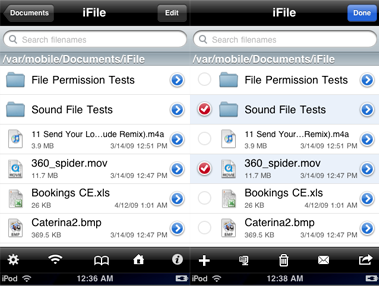
This is an updated iFile 1.4.1-1 is cracked .deb file and only applicable with iPhone jailbroken. It works for iPhone, iPod touch and now Ipad. It allows fast navigation through the iPhone file system. You can directly view files of various types, e.g. movies, sound, text, HTML, Microsoft types, PDF, various compressed formats. For PDF files direct jumping to pages is possible. ZIP packing and compressed file unpacking is also supported. Files can be sent as email attachments. Text files and property lists can be edited. Folders and files can be bookmarked. In addition, files can be uploaded and downloaded from iFile’s built-in web server.

For those who would like to install the old version of iFile you can download it here.


How To Install cracked iFile 1.4.1-1 .deb file


Alternate Ways To Install:

Auto Installation

Ssh your iPhone. You may see instruction on how to install .deb file via SSH. And make a folder called AutoInstall in/var/root/Media/Cydia/ so you have /var/root/Media/Cydia/AutoInstall which is case sensitive and drop this debs file in the autoinstall folder, reboot and respring your iPhone.

OR

Auto Installation Using i-FunBox

You may click here for easy way of auto installation using i-FunBox. Just use your USB cable!


Category: Sports
Price: $14.99

Size: 6.8 MB

Latest version: 1.3.1


Track the location, speed, and type of every pitch thrown in every MLB game in real-time, get detailed box scores, play-by-play, and player stats, watch in-game highlights and listen to LIVE audio broadcasts with your choice of home or away announcers (where available). Plus MLB.TV subscribers can log in to watch full Regular Season live games (Blackout Restrictions Apply, see www.MLB.tv for details) with enhanced features providing access to stats over the broadcast feed and Play/Pause/Rewind capabilities.


Compatible with iPad. Requires iPhone OS 3.2 or later. You can purchase via direct iTunes link OR download cracked .ipa file code:

http://www.filedude.com/download/VxH7OsCtPp1431b16fd1

The Spirit jailbreak tool is simply awesome. It’s super easy and offers Untethered Jailbreak for all iPhones. For those who are new to jailbreaking, you probably wonder why you need to jailbreak. As you may know, the App Store is tightly controlled by Apple and only approved iPad apps can make into the app store.

For instance, an innovative app that intends to brings dashboard to iPad was rejected by Apple. However, this rejected apps is now available on jailbroken iPad. By jailbreaking your iPad, it brings endless possibilities to this magical device and allows you to install these third party application through cydia. Assumed that you are running iPhone OS 3.2 and iTunes 9.1 on your computer. You may read for further information about Spirit here.

1. Before you proceed to jailbreak process, remember to sync your iPhone with iTunes to backup all your data.

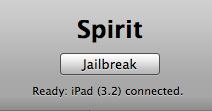
2. Download Spirit jailbreak tool from here (Windows / Mac ) and extract the zip file.

3. Launch the Spirit application

4. Once the Spirit tool is launched, plug into your iPhone via USB and the tool detects your current iPhone OS version. Simply click the “Jailbreak” button.


5. Your iPad will be rebooted and automatically goes through the Spirit jailbreak process. Don’t touch the iPad or disconnect the USB. Just wait. Once completed, your iPad is jailbroken with cydia installed.

6. Please note that cydia on iPad is still in beta. It may crush intermittently. Also, some packages in Cydia are still not compatible with iPad yet and may screw up your system that requires you to restore. If you are scared about that, I suggest you to hold off the jailbreak and wait until cydia for iPad comes out-of-beta.