Showing posts with label iPad. Show all posts

iPhoneIslam the creators of FaceIt3GS which enables facetime calls for the iphone 3gs have out done themselves once again. Today they show us a PhoneItPad new tweak that fully enables phone calls and text messaging on your ipad 3g. It’s always been our dream to hold up the huge ipad to our face and start talking away, the look on peoples face?...According to iPhoneislam

hack that will change the game. Can you imagine turning your iPad to a fully functional phone.

With No Special Hardware all what you need is Jailbroken iPad 3G and your iPad 3G will do anything you expect from iPhone… Phone Calls, SMS, FaceTime by Phone Number… ETC


iFixYouri has posted up a video demonstrating just how tough the 1st gen and 2nd gen ipad glass is. Who knew you could bend the glass that much without breaking it although we do have one more question. Who bends their ipad that much anyway?


Apple’s iPad 2 released yesterday and the online orders are already open. Click link here for online purchasing. theres no expedited shipping and the delivery date has been bumped back 2-3 weeks. If you wanted to get an iPad as soon as possible, your only option now is to get in line at one of your local retail stores..

According to Apple, here the price:

Pricing:
iPad 2 with Wi-Fi is available for a suggested retail price of $499 for the 16GB model, $599 for the 32GB model, $699 for the 64GB model. iPad 2 with Wi-Fi + 3G is available for a suggested retail price of $629 for the 16GB model, $729 for the 32GB model and $829 for the 64GB model. iPad 2 with Wi-Fi + 3G compatible with the Verizon network is available in the US only for a suggested retail price of $629 for the 16GB model, $729 for the 32GB model and $829 for the 64GB model.
\

As a rumors, Apple is revealing the iPad 2. The iPad 2 price is just the same as previous generation iPad which places it with a competitive edge over other tablets in the market. More specs of the thinner, faster processor.

What we are most amazed by is how Apple managed to decrease the iPad’s thickness, pack a twice as powerful A5 processor and still managed to give us 10 hours of battery life on this. With the addition of the FaceTime cameras this is going to make twice as much sales as the first generation iPad.


What's New:
  • Dual Core A5 processor – upto two times faster than previous model
  • Thinner by 33% – 8.8mm as compared to 13.4mm
  • Enhanced graphics – new GPU nine times faster
  • Two cameras – front and rear
  • Built in Gyroscope like iPhone and iPod Touch for motion detectiion/gaming
  • Battery life same as 10 hours – in spite of new processor and decreased thickness
  • FaceTime ability to make video calls to iPhone 4, iPod Touch 4G and Macs


Moreover, the decreased thickness makes the iPhone 4 an inferiority complex. The iPhone 4 is 9.3mm thick as compared to iPad’s 8.8mm. This is almost as hot as the iPod Touch now. Plus, we must also mention that the iPad 2 is being launched in white color model as well.

The Price

The prices are exactly the same as previous generation iPads. The iPad, as reiterated by Apple, is offered at an unbelievable price as compared to its rivals in the market. The Motorola Xoom, for example is priced at $800(comparable to 32GB 3G model).

Both the iPad 2 and iOS 4.3 will be released on March 11th in the USA and 26 more countries on March 25th.


[Image Via Engadget]

The iOS device is more portable and I can watch video anywhere (in bed, sofa or even in washroom!). Odd is before watching the video on the device, you normally need to transfer the video from computer to iPad/iPhone via iTunes. This is quite troublesome. If you face a similar situation, you must try AirView. AirView is an app that turns any iOS devices (including iPhone, iPad and iPod touch) into an AirPlay receiver, such that you can simply stream any videos from iTunes to the device by clicking a single button.

Stream Video From iTunes To iPad/iPhone

Simply launch AirView on iPhone. Play the video on iTunes, click the “Airplay” button and select your device (e.g. rdsbc’s iPhone). iTunes will automatically stream video to your device.


Stream Video Betwewn Two iPhones

You can also stream video between two iPhones (or other iOS devices). Just make sure both devices are on the same WiFi network. While you’re playing a video in iPod app (or in YouTube), tap the “AirPlay” button and select the other iPhone with AirView running. The video will be streamed and played on the other iPhone.


AirPlay, the audio and video streaming capability, is a new feature on iOS 4.2. So to use AirView your device should be running iOS 4.2 or up. A final caveat for AirView is that it only supports video streaming. You can’t stream photos or audio. Anyhow, the app works really great for video streaming and is worth grabbing. AirView is now available on AppStore For free. You can download it via direct iTunes link here.

If you’re planning to purchase an iPad, hold off a bit and wait for a few more days. As reported by All Things D, Apple will host an event on March 2 to unveil the next generation of iPad, currently known as iPad 2.

The new iPad is expected to be thinner and lighter. It’ll possibly come with improved processing power, a better screen, more RAM and storage, as well as, front-facing camera for FaceTime video chat support. Some reports suggested the iPad 2 will even be powered by one of Qualcomm’s multimode chips and will run on both GSM and CDMA-based networks around the world. All these features are just speculations without any confirmation from Apple. Let’s wait for a week more to find out what Apple bundles in the iPad 2.

Its been known that Apple products are made with great quality and yet again here is another example. A reader over at tuaw recently emailed them an interesting story and video to go along with. We only recommend one thing, don’t drop your ipad outside long enough to be ran over.. Better yet don’t drop your ipad at all, we hope she recovers well although the medical bills may be rather high!

According to Tuaw:

An iPad belonging to a fellow employee handled being run over by the front and rear wheels of a Chrysler PT Cruiser. As the video shows, the iPad was in the standard Apple Case and the front glass was crushed quite extensively. However, the Home button still worked and the rest of the components in the display were totally functional. The touchscreen still responded to gestures, and the accelerometer responded by rotating the screen.


Facetime For iPad Leaked

Posted by RDSBC | 8:40 PM | , | 0 comments »

Before you all get excited you can’t actually use facetime for ipad on your current 1st gen ipad but maybe one day you’ll be able to. A reader over at iPaDevice has found that the facetime app in iOS 4.3 beta 1 contains support for the ipad and he has figured out a way to get it running.

Although not fully functional we’re at least getting a glimpse of what Facetime will look like on the iPad 2. If facetime ever becomes functional on the 1st gen ipad we’ll be sure and let you know so stay tuned.


iPad is Delicious

Posted by RDSBC | 10:43 AM | , , | 0 comments »

Apple has started airing a new commercial, iPad is delicious. The commercial pretty much portrays how useful the ipad can be in many many different instances.


iClarified is reporting that Sharp has demoed a restaurant ordering system using the ipad. This isn’t coming anytime soon but I wouldn’t be surprised if in the future it is how we ordered our food at a restaurant. I can imagine it now. Look at the dish and zoom by pinching, tap to get nutrition info and ingredients, the possibilities are endless. What do you think would this be convinient?


Category: Games
Version: 1.0.2
Size: 252 MB
Price: $4.99


The stunning graphics have been specially enhanced for the iPad. And combined with authentic settings inspired by real WWII battlefields, the action is more lifelike than ever. For the first time, challenge up to 5 friends to multiplayer battles on a variety of five maps in 3 different modes (Free For All, Team Deathmatch, Domination). You can connect locally via Bluetooth or even go online with Wi-Fi to battle friends anywhere. Take control of 3 different vehicles including a tank, 4x4 or glider to overrun your opponents - or to make a daring escape. You can even jump behind the vehicle turret to lay waste to foes with the machine gun.


Compatible with iPad. Requires iPhone OS 3.2 or later. You can purchase via direct iTunes link OR download cracked .ipa file code:

http://hotfile.com/dl/65143890/7b7d6ce/010.Brothers.In.Arms.2.Global.Front.HD-v1.0.2.ipa.html

Category: Sports
Price: $14.99

Size: 6.8 MB

Latest version: 1.3.1


Track the location, speed, and type of every pitch thrown in every MLB game in real-time, get detailed box scores, play-by-play, and player stats, watch in-game highlights and listen to LIVE audio broadcasts with your choice of home or away announcers (where available). Plus MLB.TV subscribers can log in to watch full Regular Season live games (Blackout Restrictions Apply, see www.MLB.tv for details) with enhanced features providing access to stats over the broadcast feed and Play/Pause/Rewind capabilities.


Compatible with iPad. Requires iPhone OS 3.2 or later. You can purchase via direct iTunes link OR download cracked .ipa file code:

http://www.filedude.com/download/VxH7OsCtPp1431b16fd1

Category: Games
Version: 1.0.0
Size: 522 MB
Price: $9.99


Play as Sam Fisher, a highly skilled Special Forces operative and fight a corrupted secret agency to get your daughter back. Follow a trail of intrigue that leads from Iraq to a high-security building in Washington. Run, jump, fight, and shoot using a handgun, shotgun, AK47 and bazooka, or maintain stealth by improvising with nearby objects. You are now a renegade spy agent; you don't follow any orders except for your own rules of engagement!


Compatible with iPad 3.2. Requires iPhone OS 3.2 or later. You can purchase via direct iTunes link OR download cracked .ipa file code:

http://hotfile.com/dl/65138409/591ca76/010.Splinter.Cell.Conviction.HD-v1.0.0-HcKd.ipa.html

The windows seven tablet lacks the smoothness of ios and lags quite a bit but it makes it all up up being able to install a lot of windows programs along with having a camera, usb ports, sd slot. This may actually put up a fight against the ipad but in the end the ipad will still prevail.

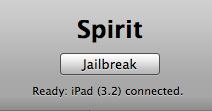
The Spirit jailbreak tool is simply awesome. It’s super easy and offers Untethered Jailbreak for all iPhones. For those who are new to jailbreaking, you probably wonder why you need to jailbreak. As you may know, the App Store is tightly controlled by Apple and only approved iPad apps can make into the app store.

For instance, an innovative app that intends to brings dashboard to iPad was rejected by Apple. However, this rejected apps is now available on jailbroken iPad. By jailbreaking your iPad, it brings endless possibilities to this magical device and allows you to install these third party application through cydia. Assumed that you are running iPhone OS 3.2 and iTunes 9.1 on your computer. You may read for further information about Spirit here.

1. Before you proceed to jailbreak process, remember to sync your iPhone with iTunes to backup all your data.

2. Download Spirit jailbreak tool from here (Windows / Mac ) and extract the zip file.

3. Launch the Spirit application

4. Once the Spirit tool is launched, plug into your iPhone via USB and the tool detects your current iPhone OS version. Simply click the “Jailbreak” button.


5. Your iPad will be rebooted and automatically goes through the Spirit jailbreak process. Don’t touch the iPad or disconnect the USB. Just wait. Once completed, your iPad is jailbroken with cydia installed.

6. Please note that cydia on iPad is still in beta. It may crush intermittently. Also, some packages in Cydia are still not compatible with iPad yet and may screw up your system that requires you to restore. If you are scared about that, I suggest you to hold off the jailbreak and wait until cydia for iPad comes out-of-beta.

Category: Navigation
Price: $119.99
Size: 517MB

Latest version: 1.5.0

The NAVIGON MobileNavigator fits in seamlessly with the operating concept of the iPhone. The application includes the latest map material from the market leader NAVTEQ and can be used without an Internet connection, which is of enormous benefit abroad, for example, as no extra charges are incurred. With the NAVIGON MobileNavigator you can transform your iPhone into a fully functional mobile navigation system that is every bit as good as the multi-award-winning personal navigation devices from NAVIGON in terms of its user-friendliness and features.

Features and range of functions:
- Speed Assistant with adjustable audio-visual warning
- Day and night mode for map display
- Direct access and navigation to contacts saved in the iPhone’s address book
- The latest NAVTEQ map material
- Navigation is automatically resumed after an incoming phone call
- 2D and 3D map displays (bird’s-eye view)
- Quick access to user-defined POIs in the area and along the route
- Take Me Home function with a single click
- Automatic language selection to match the iPhone’s user language


Included maps:
Albania, Andorra, Belarus, Belgium, Bosnia-Herzegovina, Bulgaria, Denmark, Germany, Estonia, Finland, France, Gibraltar, Greece, United Kingdom, Ireland , Italy, Croatia, Latvia, Liechtenstein, Lithuania, Luxembourg, Macedonia, Monaco, Montenegro, Netherlands, Norway, Austria, Poland, Portugal, Romania, San Marino, Sweden, Switzerland, Serbia, Slovakia, Slovenia, Spain, Czech Republic, Hungary, Vatican
.

Compatible with iPad, iPhone and iPod touch and minimum requires is iPhone OS 3.0 firmware updated or later. You can purchase via direct iTunes link or download cracked .ipa file here:

http://www.zshare.net/download/75181983fad7e9a8/


For those iPad users without any iPhone experience, you probably do not know how to capture a screen. Like iPhone and iPod touch, Apple offers the same way to grab a screenshot. Whenever you come across a screen that you want to capture (say, a map), press both “Power/Sleep” and “Home” buttons at the same time. You then notice a momentarily flash. That’s it. The screen is captured and saved.

To view the screenshot, simply launch “Photos” app and tap “Saved Photos”. The screenshot should be there.


Share Your Screenshot With Others

To share the screenshot with your friend, just tap on the photo, tap arrow button and select “Email Photo” to send it via email. Or if you have installed Facebook or iLoader, you can also upload the screenshot directly to your Facebook account for sharing. Or you can also connect the iPad via USB to transfer the image to your computer.


Apple has finally released their long awaited tablet. Here’s how much it will cost you and when it will be available.

Hardware Costs
The iPad comes in three sizes: 16GB, 32GB, 64GB.

You have the choice of purchasing the device with or without 3G Internet access.

iPad 16GB: $499
iPad 32GB: $599
iPad 64GB: $699

iPad 16GB 3G: $629
iPad 32GB 3G: $729
iPad 64GB 3G: $829

Data Plan Costs

Apple has decided to stick with AT&T despite their network issues. At least this time there is no contract involved, the tablet is fully unlocked, and activation can happen right on the device. Unfortunately, the iPad will use a new micro SIM which will means you won’t be able to insert your iPhone SIM.

$14.99/month – 250MB of data
$29.99/month – Unlimited data

Availability

The Wi-Fi only edition of the iPad will be available in late March worldwide. The Wi-Fi + 3G models of iPad will be available in April in the US and selected countries. iPad will be sold in the US through the Apple Store, Apple’s retail stores and select Apple Authorized Resellers. International pricing and worldwide availability will be announced at a later date. iBookstore will be available in the US at launch.

[Via iclarified.com]


The screen is gorgeous, tilting is responsive, and the thing is super thin. Still, if you’ve used the iPhone before — and you can see the two devices side-by-side here — there’s not a lot of surprises here so far. Here are some initial thoughts on the iPad:
  • It’s not light. It feels pretty weighty in your hand.
  • The screen is stunning, and it’s 1024 x 768. Feels just like a huge iPhone in your hands.
  • The speed of the CPU is something to be marveled at. It is blazingly fast from what we can tell. Webpages loaded up super fast, and scrolling was without a hiccup. Moving into and out of apps was a breeze. Everything flew.
  • There’s no multitasking at all. It’s a real disappointment. All this power and very little you can do with it at once. No multitasking means no streaming Pandora when you’re working in Pages… you can figure it out. It’s a real setback for this device.
  • The ebook implementation is about as close as you can get to reading without a stack of bound paper in your hand. The visual stuff really helps flesh out the experience. It may be just for show, but it counts here.
  • No camera. None, nada. Zip. No video conferencing here folks. Hell, it doesn’t have an SMS app!
  • It’s running iPhone OS 3.2.
  • The keyboard is good, not great. Not quite as responsive as it looked in the demos.
  • No Flash confirmed. So Hulu is out for you, folks!

[Via engadget.com]